Get a quote in
Peppermint Grove, WA 6011
Find and get quotes from businesses in Peppermint Grove, WA 6011.
Get a quote its free!
Top businesses in Peppermint Grove, WA 6011





Latest reviews of Peppermint Grove, WA 6011 businesses
We had a broken toilet with parts that were very difficult to source. Eco plumbing and gas managed to eventually find the parts and fix the toilet. We will definitely use them again
I wanted to say a huge thank you. My experience with Michelle was positive from start to finish. I was so impressed by her efficiency, kindness and how approachable she was.
When I first moved in she was happy to answer all my questions as I was new to renting. If there were any issues in the apartment, Michelle was onto organising someone to fix it right away. I never had to wait, I couldn't believe how quick she was at everything despite how many properties she manages.
When I needed to complete a lease variation a few months later, there were some hurdles with the other tenant. Michelle remained patient and did everything she could to help my Dad and I.
She's a wonderful employee and I appreciate all the hard work she has put in. Space is very lucky to have her, I feel!
Bakery was alright, they had sold out of most stuff quite quick and Chicken & Veggie pie was average but still good experience!
Not only were the staff friendly, and professional the venue was also clean and well maintained.
The cocktails were delicious and the cheese burger... well! I’m fussy and that was the most delicious burger I have ever had. It was fresh and soft! I would highly recommend!
The lamb & rosemary pie was delicious! Coffee is good, too
Lontara is incredible, the food is next level amazing and Eliza & the staff are a very friendly, awesome bunch! Compliments to the head chef Will for his skill and cooking! Best dishes!! After a pretty disappointing experience dealing with issues with Samphire, we had two really, really good nights eating at Lontara and we strongly recommend! Thank you for helping to brighten our honeymoon!!
The iconic Rottnest Bakery established in 1952 has Great tasty pies and fantastic cakes, doughnuts, vegemite and cheese scrolls, bread rolls made up with different fillings all extremely fresh and all made on the premises. Plenty of outdoor bench seats and tables with some undercover.
Amazing dinner and one of my favourite meals of the year. As good as anything on the mainland and worth coming back to Rottnest for. Fresh ingredients, punchy Indonesian and other SE Asian flavours, beautiful seafood and nice wine list with a mix of local and international options. Well priced too, doesn’t feel like you’re paying island premiums. Loved it!
Saturday night dinner at Lontara fully booked. food was really good. Oysters a favorite. Food and Beverage service was great. They had run out of the wine we selected so went out of their way to accommodate. Not much for our not spicy friendly teens however overall enjoyable dining. Great for Rotto to have this. Tip....dozen oysters glass of bubbles lunch done and back to the boat!!
Steak and pepper pie, chocolate doughnuts and a chocolate cake. Delicious.
I have had excellent service from Space's rental team. During our search, I worked with Natalie and Teresa, who were both very well-informed and proactive, and Natalie is now our property manager and is always helpful and very responsive if we need anything. I have found the company to be professional and easy to work with.
Excellent food and equally as impressive service. Great night at Lontara.
Great drinks, we had cocktails and beer.
For lunch, we had the cheeseburger and the prawn cocktail, both were average.
For dinner, we had the steak dish and pork belly dish, the steak was a bit overcooked and the crispy pork belly dish was not crispy but both dishes were reasonably tasty.
Overall pretty limited and overpriced menu.
Get connected with the best businesses in your area
We independently verify businesses all around Australia so you can have the confidence that you're getting a good deal when you get a quote through us.
Get a quote its free!What's happening in Peppermint Grove, WA 6011
Search Scope
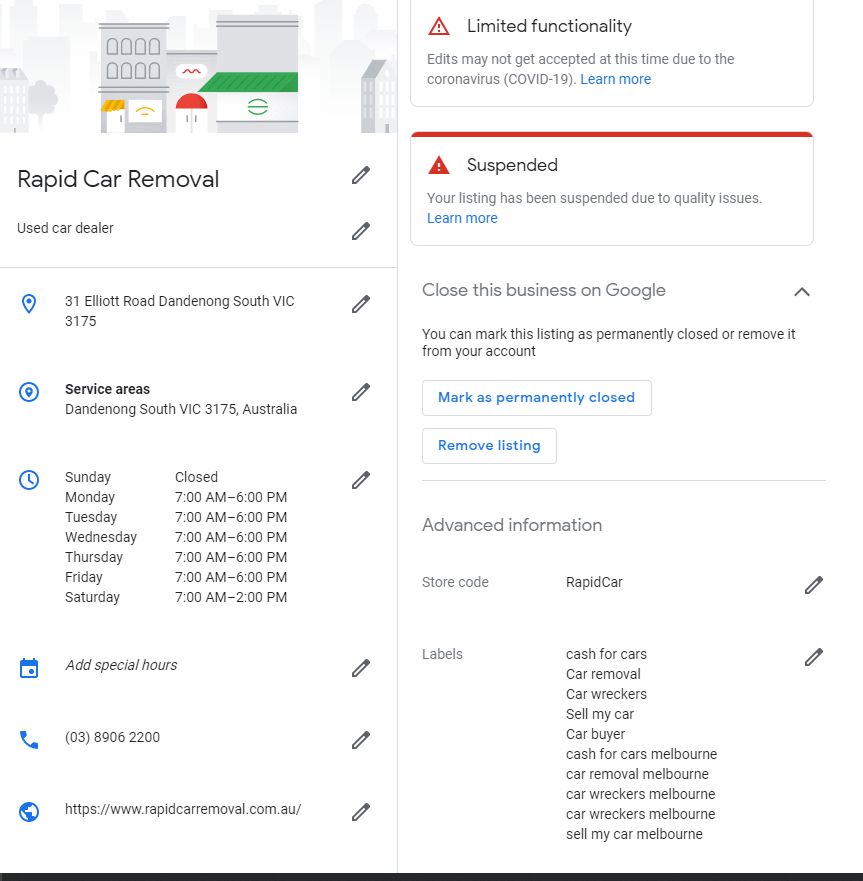
11 Mar 2025Why Google Business Profile Suspensions Happen & How to Prevent Them
A suspended Google Business Profile (GBP) can hurt your business by making you invisible on Google Search and Maps. This guide explains why suspensions happen, how to prevent them, and what to do if your profile gets suspended.
Common Reasons for Suspension
1. Violating Google’s Guidelines
Using a virtual office or P.O. Box instead of a real address.
Stuffing keywords into your business name.
Creating multiple listings for the same business.
2. Inconsistent or Fake Business Information
Mismatched Name, Address, Phone (NAP) details across listings.
Fake or misleading business information.
3. Frequent or Suspicious Changes
Changing business categories, addresses, or names too often.
Multiple people managing the profile from different locations.
4. Fake or Spammy Reviews
Buying fake reviews or receiving a sudden spike in reviews.
Customers or competitors reporting your listing.
How to Prevent Suspensions
1. Follow Google’s Guidelines
Check Google’s Business Profile guidelines to ensure compliance.
2. Keep Business Information Accurate
Ensure NAP consistency across your website, social media, and directories.
3. Avoid Too Many Changes at Once
Update details only when necessary and do so gradually.
4. Limit Access to Trusted Users
Only allow essential team members to manage your profile.
5. Encourage Genuine Reviews
Avoid purchasing reviews and monitor feedback for authenticity.
How to Recover a Suspended Profile
1. Identify the Suspension Reason
Check Google’s notification for clues about the issue.
2. Review Google’s Policies
Ensure your profile follows all rules before requesting reinstatement.
3. Submit a Reinstatement Request
Use Google’s Reinstatement Form. Include:
Business details (name, address, phone number, website).
Proof of business legitimacy (e.g., utility bill, storefront photos).
4. Follow Up If Needed
Google’s review process may take time. Follow up if you don’t get a response.
Conclusion
To avoid suspensions, follow Google’s guidelines, maintain accurate business details, and limit suspicious activity. If suspended, act quickly to restore your profile. Need professional assistance? Contact an experienced local SEO specialist like Search Scope to ensure your Google Business Profile remains active and optimized for success.